Skip to content
Jason A. Heppler

Microblog

Microblog

Recovering U.S. Government Data and Websites

A number of years ago I founded, along with Brandon Locke and Sarah Melton, Endangered Data Week, designed to highlight threats to publicly available data as well as train folks to work with data. And while EDW wound down in 2020, the work and skills remain essential. The End of Term Web Archiving team has been working hard to archive datasets and government websites that were at risk of being taken offline or have gone offline since January 20, as have the good folks over at r/DataHoarder.

Today, the New York Times has a good piece on the government websites that have gone offline.

Academia

Own Your Turf

Jason Koebler:

If it wasn’t already obvious, the last 72 hours have made it crystal clear that it is urgent to build and mainstream alternative, decentralized social media platforms that are resistant to government censorship and control, are not owned by oligarchs and dominated by their algorithms, and in which users own their follower list and can port it elsewhere easily and without restriction.

Molly White:

The TikTok ban, the Musk Twitter takeover, the Facebook moderation policy changes, the Republicans’ rapidly intensifying crackdowns on speech… let these be the proof you needed to move anything you care about online to a space you control.

Indie web·Twoquotes

Lamentable Word

Charlie Stross:

The reason I want Word to die is that until it does, it is unavoidable. I do not write novels using Microsoft Word. I use a variety of other tools, from Scrivener (a program designed for managing the structure and editing of large compound documents, which works in a manner analogous to a programmer’s integrated development environment if Word were a basic text editor) to classic text editors such as Vim. But somehow, the major publishers have been browbeaten into believing that Word is the sine qua non of document production systems. They have warped and corrupted their production workflow into using Microsoft Word .doc[x] files as their raw substrate, even though this is a file format ill-suited for editorial or typesetting chores. And they expect me to integrate myself into a Word-centric workflow, even though it’s an inappropriate, damaging, and laborious tool for the job. It is, quite simply, unavoidable. And worse, by its very prominence, we become blind to the possibility that our tools for document creation could be improved. It has held us back for nearly 25 years already; I hope we will find something better to take its place soon.

Alan Jacobs:

In every book that I work on, the worst moment of the entire endeavor occurs when I have to convert my plain-text draft into Word format for my editors. I don’t have to open Word to do that, thanks to pandoc, whose use I explain here; but I know then that I have only a short time before they send me back an edited text which I will have to open in Word. And from that point on there can be no joy in the labor, only misery. Microsoft Word is not just a terrible program. It is a terrible, horrible, no good, very bad program. It is the program than which no worse can be conceived. We hates it, preciousss. We hates it.

Writing·Twoquotes

Two Quotes on Owning Your Turf

Jason Koebler:

If it wasn’t already obvious, the last 72 hours have made it crystal clear that it is urgent to build and mainstream alternative, decentralized social media platforms that are resistant to government censorship and control, are not owned by oligarchs and dominated by their algorithms, and in which users own their follower list and can port it elsewhere easily and without restriction.

Molly White:

The TikTok ban, the Musk Twitter takeover, the Facebook moderation policy changes, the Republicans’ rapidly intensifying crackdowns on speech… let these be the proof you needed to move anything you care about online to a space you control.

Twoquotes·Indie web

Returning to Firefox

For the past few weeks I’ve been using the Zen browser, a fork of Firefox that comes with some preference changes and nice interface updates: the vertical tabs are really nice, as is the workspace management. And, since it’s a fork of Firefox, all of my usual Firefox add-ons and my Mozilla account can sync with Zen.

But, there were a few mild annoyances I kept running into, one being that Zen didn’t (yet) support Passkeys which I now use for a number of places since I’m all-in on Apple Passwords. But I also had some general concerns about Zen not keeping up with the update pace of Firefox itself, especially if security updates were needed. So, I decided to give Firefox a full try again.

I’ve been a Safari user for a long while now (I stopped actively using Chrome years ago but Firefox was always around, especially the development version for my day to day work). But Safari worked great, and its seamless syncing between my laptop and iOS devices was an added bonus. Plus I try to keep my apps as close to default as I can, so Safari made sense. But as someone who cares a lot about the open web and the organizations that support it, I’ve always had a soft spot for Mozilla (including working with the Foundation) and Zen made me realize how much I missed supporting their cause.

So I had some misgivings about Zen, and I’d rather support Firefox itself. So I decided to do some poking around and see how much of Zen’s features I liked I could replicate in Firefox. It turns out, I’ve basically achieved everything I like about Zen.
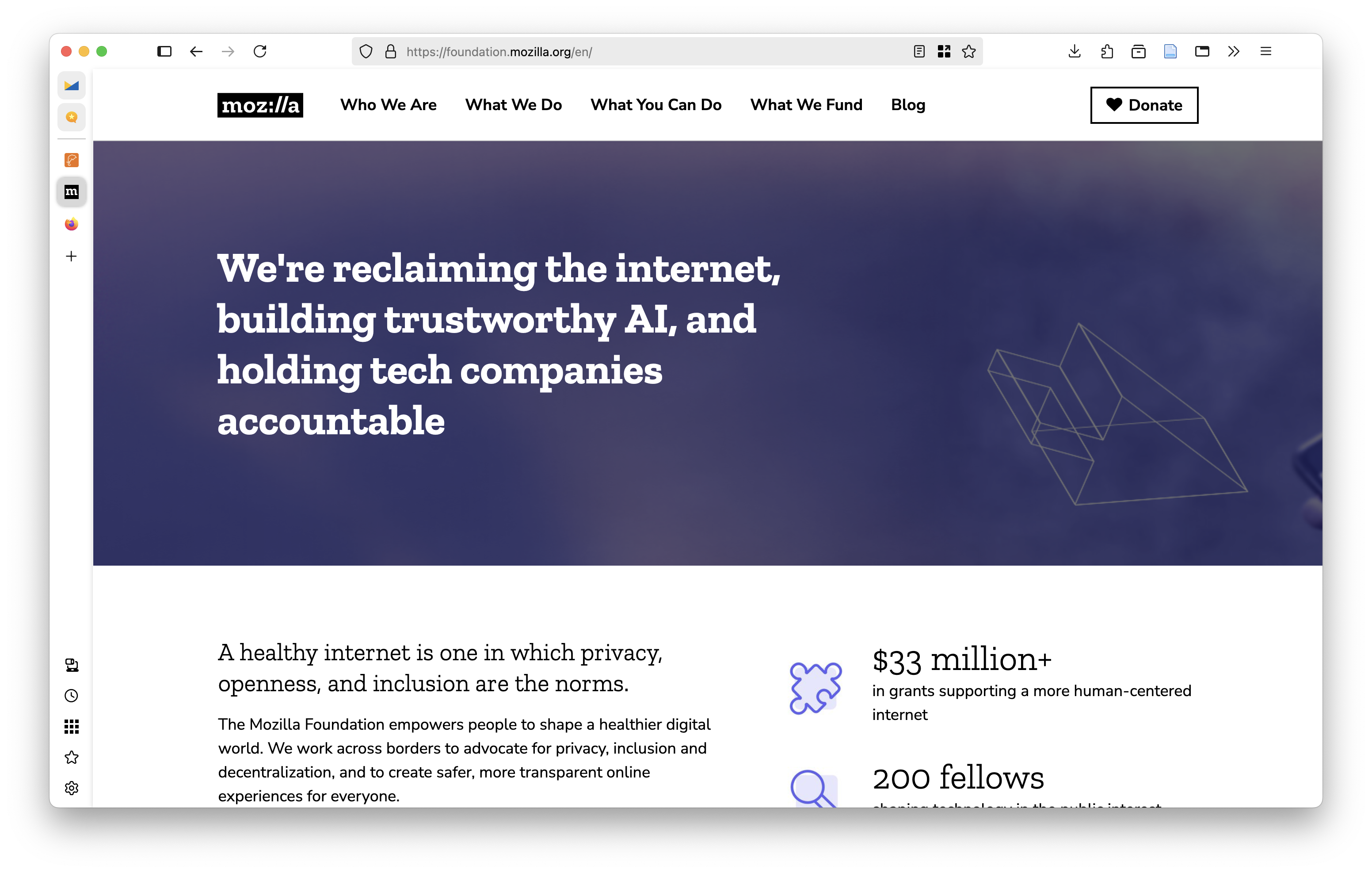
Auto-generated description: A webpage featuring Mozilla's mission statement about internet privacy, AI trust, and accountability for tech companies, along with grant and fellowship details.

Vertical Tabs

Vertical tabs became a hot thing with the release of Arc: rather than page tabs across the top of your browser window like we’ve been doing for the past two decades, tabs are arranged to the left or right of the page viewer. The reason for this seems obvious: the horizontal tabs are limited by space because there’s only so much screen width the tabs can occupy before the must start shrinking down into smaller and smaller tabs. But vertical tabs stack, meaning you can scroll through a list instead of scan horizontally. In addition, features like tab grouping in vertical lists means any repeat URLs you have are collected together. For example, if you have multiple tabs open from economist.com, some implementations of vertical tabs will stack all of those open tabs under an Economist header and indent all related URLs to keep things organized. I typically keep my open tabs to a minimum, but on days when I’m doing a lot of work in the browser having these tabs grouped this way is a vastly superior experience to a horizontal tab bar.

Zen implements this feature really well and gives you a few options to how those lay out: you can have a full sidebar that shows you a snippet of a page’s title, or you can do compact mode which reduces the vertical tabs to just the side’s favicons (this is my preference – on mouseover, you get a preview of the page which for me mostly negates the need of seeing the title. But popping open the compact view is straightforward if I need to see more information.)

The good news is that Firefox introduced an experimental version of this about five months ago and it can be easily enabled in the latest release.

  1. Navigate to about:config and tell Firefox you accept the risks.
  2. In the search bar for the preferences, search for verticalTabs.
  3. You’re looking for the setting called sidebar.verticalTabs. On that line, double click to set sidebar.verticalTabs from False to True and the window will instantly switch the tabs.

That’s it. It’s still experimental, which is why we have to go through the about:config instead of general settings. But so far in my experience it’s rock solid.

Now, there’s one missing feature here. Zen has a concept of Workspaces for your tabs, which sort of works how Apple implemented a similar feature in Safari (and, I believe, Microsoft Edge also does). I can have different workspaces, like Work or Home or Research, and throw tabs into those workspaces. When I toggle between these workspaces, only those tabs that belong to that workspace appear in my tab navigation. I find this really helpful for organizing active tabs. It’s a feature I only sometimes remembered to use in Safari, but in Zen/Firefox I use it constantly because it’s just a click away right alongside the tabs.

Firefox doesn’t have a native way to do this (yet?), but I’ve been giving the add-on Simple Tab Groups a try and it mostly replicates the experience. It’s not quite as visually smooth as Zen’s implementation, but for now it’s close enough for me.

Firefox View

One feature I’ve not seen any other browser implement is what Mozilla calls Firefox View, and it’s really nice. View collects all of your tabs (currently open, recently closed, and tabs from other devices) all in one place in a simple interface. It’s a nice way to to fetch something from another device or find something in my browsing history.
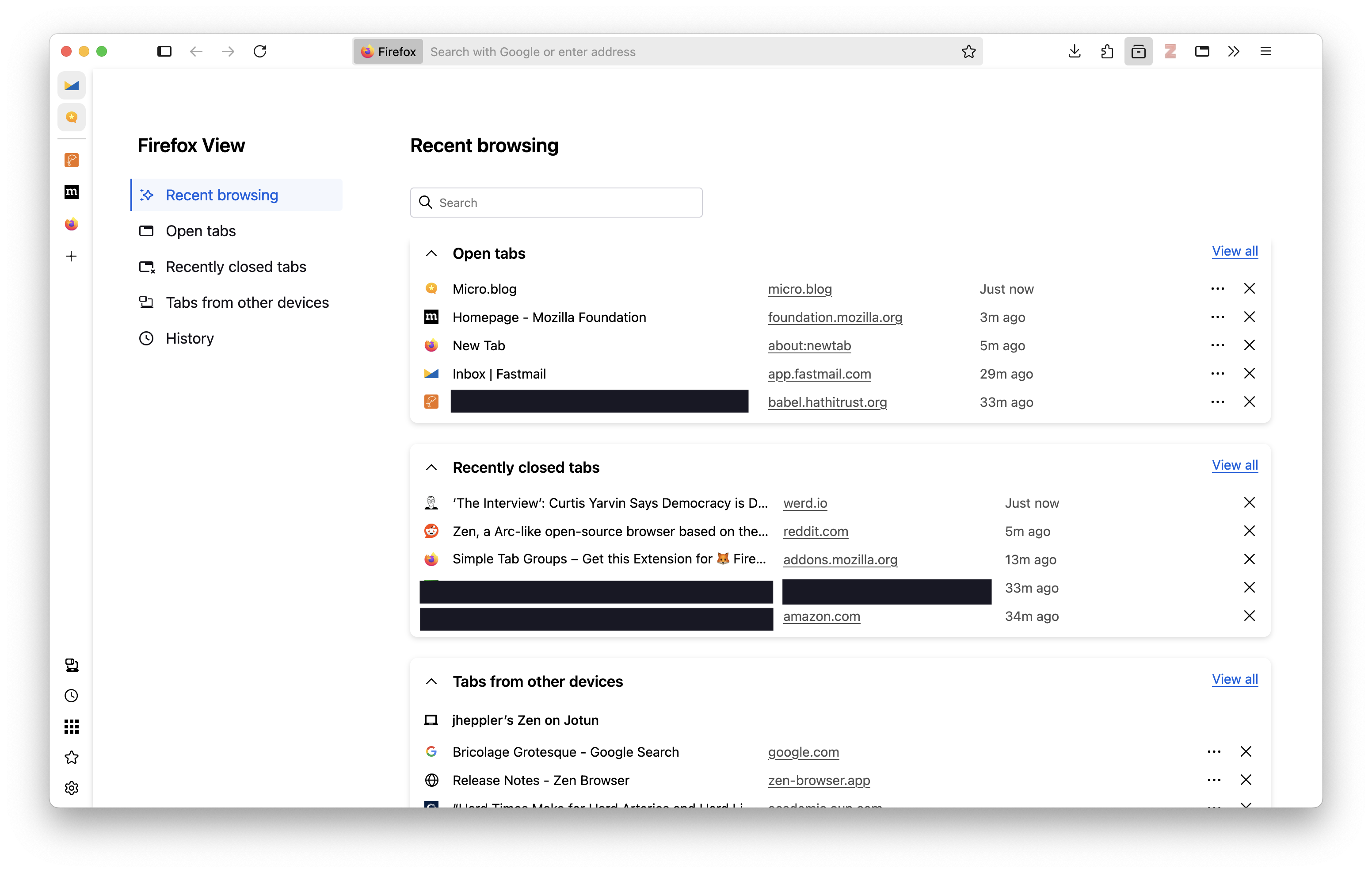
Auto-generated description: A screenshot of the Firefox browser displays the Recent browsing section, showing a list of open and recently closed tabs alongside a sidebar menu with several navigation options.

iOS / iPadOS

The one misgiving I have about Firefox is not Mozilla’s fault: the iOS/iPadOS app.

Apple restricts how much third party browsers are able to do, meaning that they are really just wrappers around Safari/WebKit (that is, it’s Safari under the hood with different user chrome). This means my plugins are not usable since Apple’s WebKit plugin architecture is proprietary and only Safari can install plugins.1 A potential work-around especially for things like tracking blocking is Firefox Focus, but because it’s designed to be privacy centric it does not include your Mozilla profile.

For now that means I’m sticking with Safari on my phone and iPad because I still want access to the plugins I use. I might lose some potential helpful integrations this way (like tab syncing), but I’m perfectly happy with Safari.2

Zen features I’ve ignored

There are a few things Zen does that I would place into the realm of “window management”: things like web panels and split view, which are neat but not things I usually need so they’re not coming over to my Firefox. (There are ways to do this through add-ons, though, if you do like these features. Poke around the Firefox subreddit and you can find ways to do these things.)

I think what Zen is doing is actually very good: innovations in browsers, especially ones not built with Chromium, is a good thing for the web and a good thing for users. And, perhaps, Firefox will sherlock a few of these features into the core browser. But I want to support Firefox, and I appreciate Zen demonstrating another way to experience how we interact with the web.

Extensions

Here are the current add-ons I have for Firefox:

  • Zotero: Bibliographic management, and probably the one digital tool I’ve been using the longest.
  • Unpaywall: Another scholarly tool. An open database of 20+ million scholarly works. If I’m on a page for an article, it notifies me if there’s a legal open access version and provides a link to it.
  • uBlock: The go-to for content blocking.
  • uBlacklist: I primarily use this to block AI slop and content farms results in my Google search. Works great.
  • Chrome Mask: Optionally make Firefox look like Chrome to websites.
  • Bot Sentinel: Notify me if an online account is a bot, toxic account, content farm, or toll. Less useful now that I never go on Twitter but I keep it around.
  • Firefox Multi-Account Containers: Keep cookies separated by containers.
  • Privacy Badger: An extra layer of tracker blocking on the web.
  • Simple Tab Groups: For workspace-like tab management.
  • Web Archives: Come across a page that no longer exists? This extension looks it up in the Internet Archive and delivers an older version of it.
  • &udm=14: I don’t Google’s AI-generated results helpful in my search results. This lets me avoid it by appending &udm=14 to Google search results.
  • Adaptive Tab Bar Color: Color the tab bar the same as a site’s theme.
  • iCloud Passwords: I use Apple Passwords, and this Apple-created add-on integrates Passwords with Firefox. Not excellent yet, at least not as seamless as using in Safari. Occasionally causes some sites to become slow.
  • Firefox Translations: Mozilla’s implementation of a site translation tool.
  • Fakespot: An excellent tool for spotting bot-manipulated reviews in places like Amazon and other online stores.


  1. The Orion browser by Kagi can install Chrome and Firefox extensions through what must’ve been a monumental amount of engineering work, but I’ve not given this a try yet. ↩︎

  2. I’m of two minds about this restriction. I would love to see more creative approaches to mobile browsing by allowing third party browser engines on iOS devices. On the other hand, not even Android supports Chrome’s extensions all that well. So I’m also doubtful that extensions will work well on mobile devices with custom browsers, at least not on par with their implementation on desktops. ↩︎

Tech life

Year of Foundations

I’m not a regular year-end blogger other than yearly theme posts but I wanted to take a moment at the end of 2024 to reflect amidst my own 2025 theme. One thing I’ve done pretty consistently since 2021 is to consider a yearly theme. Those have been:

  • 2022: Year of Lagom
  • 2023: Year of Festina Lente
  • 2024: Year of Work
  • 2025: Year of Foundation

Foundation for me means a few things: new structures in place around health and fitness, some long-term work we’ll be doing around our acreage (barn restoration, garden expansion, orchard expansion, prairie re-wilding), career goals, and some long-term household tasks. So this year will be spent, in part, with an eye towards the future. We’ve also had, in some ways, a tough 2024. This year will serve as something of a reset as well.

If you are interested in what I’ve been reading, you can check out my micro.blog reading log.

Auto-generated description: A weathered red wooden door features a green wreath with a red bow at its center.

New Book, New Digital History, Next Book, New Blogging

In March 2024, my book Silicon Valley and the Environmental Inequalities of High Tech Urbanism came out with the University of Oklahoma Press. I’m really proud of how well the book turned out and it’s been well-received (including my neighbor, who unbeknownst to me told me he was reading it and really liked it. It’s the best review I could’ve gotten). As part of the book’s release, I did a couple of podcasts and visited a few classes to talk about the project. All in all, I’m happy with the work.

It was also a busy time around RRCHNM. We launched several new projects this year, including:

  • The Arnham Postal History project, providing a database and mapping environment for tracing postal routes in the Netherlands during World War II.1
  • La Sfera, or The Globe by Gregorio Dati: Still in development but soft launched a couple of months ago, the project is a critical edition of Gregorio Dati’s La sfera manuscript written sometime around 1430.
  • The Denig Manuscript: In collaboration with the Winterthur Museum, Library and Gardens, we provide an interface to read, view, and hear the eighteenth-century illuminated manuscript by the Pennsylvania Dutch merchant Ludwig Denig.
  • Connecting Threads: Launched in October at an event in London, Connecting Threads seeks to investigate the consumption of Indian and Indian-imitation fabrics by communities of the global south. Much more is coming in the next year. To pursue that work, Deepthi Murali and I won an NEH grant to continue the work.
  • Lots of progress on existing projects as well: a redesign of the Bills of Mortality website; new content for Religious Ecologies; new work for the Civil War Graffiti project.
  • I’ll be teaching Digital Public History in our Digital Public Humanities certificate program again this spring.
  • I also began a new mentorship with one of our graduate students helping me out with development work. It’s been a lot of fun and, I hope, engaging and useful for her.

I’ve begun work on my next book as well this year. I’m returning to some work I completed in graduate school on the Sagebrush Rebellion in the northern plains. I’m hoping to spend a lot of time in the archives this year—in Colorado, Wyoming, Montana, South Dakota, North Dakota, Nebraska—so I can make some further progress on the work. Relatedly, I’ve started a side blog/newsletter called Tack & Ink where I’ll be writing about my research in progress. I hope you’ll consider subscribing.

Life

2024 wasn’t all work, of course. My family and I had a busy year of experiences: a big summer road trip through Wyoming, Montana, and Idaho; we attended concerts of Sarah Jarosz, NEEDTOBREATHE, Hozier, Bob Dylan, and Willie Nelson; visiting family; and lots of work around our acreage.

A rodeo event is taking place in an arena filled with spectators in Cody, Wyoming.A detailed LEGO cityscape features a church with colorful stained glass windows, surrounded by skyscrapers and lively street scenes.A cityscape features a dinosaur skeleton display, a modern building labeled PLANETARIUM, and a train station marked UNION STATION, with a construction crane in the background under a clear blue sky.A partially carved wooden object is surrounded by wood shavings on a cutting mat, with a carving tool nearby.A snowplow attached to a small vehicle is clearing snow near a building decorated with a wreath.A red tractor sits beside a partially burned pile of debris in a grassy, winter landscape under a cloudy sky.A large bookshelf filled with a diverse collection of books lines the wall of a room with wooden flooring.A stack of chopped firewood is neatly arranged under a corrugated metal and wooden shed.A stage features musicians performing in front of a large American flag backdrop.A red barn with the year 1914 painted on it stands under a dramatic evening sky with a purple hue.A group of chickens, including a prominent white one, are pecking on the ground inside a fenced area.A historic hotel entrance features a prominent sign reading IRMA HOTEL with decorative bunting and a circular portrait above.A calm lake reflects the clouds and sky, surrounded by forested hills under a bright blue sky.A landscape featuring rugged hills, sagebrush grasslands, and a clear blue sky.Two people in a red kayak paddle on a calm lake under a clear blue sky, with another kayak visible in the background.A cartoon baseball character with a crown is painted on a blue brick wall, featuring the text KANSAS CITY and ESTD 1969.A band is performing on stage at a venue with colorful lighting and a lively audience.Vibrant purple flowers are climbing up a wire fence in a sunlit garden.A wooden fence post stands in the foreground with green grass, while a vast, plowed field and a blue sky with scattered clouds extend into the distance.A sunny landscape with a grassy field, a plowed area, distant trees, and a bright blue sky filled with clouds.A tabby cat sits on wooden planks in front of a red barn with trees in the background.

  1. This project was transferred to the PI for hosting and, unfortunately, may not be online at the moment. ↩︎

Personal

Year-End Tech Report

Over the past few years I’ve been making changes to my technological life. It began a couple of years ago as I started to de-Google myself. Here’s where things stand at the moment:

  • Twitter has been deactivated for almost two years to the day. I spend some time on BlueSky, but I’m pretty strict about limiting myself there.
  • I spend most of my social media-esque time at Micro.blog for both short and longer-form posts. I’ve also started a second Micro.blog called Tack & Ink designed to write about and share my current research project.
  • My newsletter has fizzled out, but I’m thinking about ways I might come back to it. In the meantime, you could subscribe to the Micro.blog newsletters.
  • As part of making myself more news-resilient, I’ve shifted most of my news reading to print publications: The Atlantic, The Economist, and High Country News are the primary sources, with the Washington Post and New York Times here and there. The Economist’s The World in Brief is particularly good.
  • I’m moving a lot of my stuff out of the cloud. Dropbox has become increasingly less reliable, so I’ve been slowly moving my things to a local hard drive (which I can access on my local network anytime, or sync down to other machines using Syncthing). A few things are stored in Apple iCloud, but it’s not a service I use much for file syncing.
  • On services that have become unreliable, I’m also leaving 1Password for Apple Passwords. I don’t quite understand what happened to 1Password, but its reliability, especially its integration in Safari, is incredibly inconsistent.
  • I mentioned above my attempts to de-Google myself. A few years ago I migrated all of my email to Fastmail, which I’m very happy with. I also moved all of my calendars to Apple iCloud. This is also undergoing some change: after years as a Fantastical user, I’m going back to the stock Apple Calendar. It does everything I need and, while it has a little more friction than Fantastical, it works well. I pair Calendar with Itsycal for menu bar access.
  • DuckDuckGo is my default search engine (again, the great Google decoupling).
  • I’m still solidly behind Obsidian for note-taking, but having a fresh look at . . . notecards.

Tech life

The Legacies of the Bundyville Stand-off

Leah Sottile, host of the fantastic Bundyville podcast and contributor to High Country News, writes on the continuing legacy of the Bundyville stand-off.

When the Bundys declared victory, it was hailed as a win for their vision of the American West. It was a victory for the entire far-right antigovernment militia movement and paved the way for ultra-conservative ideas to dominate the Republican Party’s agenda.

She includes some citations to recent important work by Benjamin ParkSam Jackson, and Jessica Pishko.

One of the things I'm tracking in my new research on the Sagebrush Rebellion is how the rebellion played out in the northern Plains and Canadian prairies. There is, undoubtedly, a continuing legacy of far-right, anti-government ideology underlying its legacy.

But, at least so far in my work, I don't see this same ideology expressed so forcefully on the plains and prairies. Yet, I still see the importance of ideology, or perhaps identity, in the plains version of the movement. After all, the movement on the plains dealt with considerably less actual public lands—you can combine the entirety of federal lands across the Great Plains and come nowhere close to the percentage of land the federal government manages in Nevada alone—yet the movement still finds purchase. The thread I'm currently following: how much does the ideology and identity of the rebellion define how it acts on the plains? If the plains-style movement is less concerned about federal land, then it must be concerned with something else.

Newsletter

Wendell Berry in The Unsettling of America

Whereas the exploiter asks of a piece of land only how much and how quickly it can be made to produce, the nurturer asks a question that is much more complex and difficult: What is its carrying capacity? (That is: How much can be taken from it without diminishing it? What can it produce dependably for an indefinite time?) The exploiter wishes to earn as much as possible by as little work as possible; the nurturer expects, certainly, to have a decent living from his work, but his characteristic wish is to work as well as possible. The competence of the exploiter is in organization; that of the nurturer is in order — a human order, that is, that accommodates itself both to other order and to mystery.

Wendell berry·Repair and maintain·Place·Re placing

Newsletter

Occasional writing on the American West, agricultural history, and political culture.