Returning to Firefox
For the past few weeks I’ve been using the Zen browser, a fork of Firefox that comes with some preference changes and nice interface updates: the vertical tabs are really nice, as is the workspace management. And, since it’s a fork of Firefox, all of my usual Firefox add-ons and my Mozilla account can sync with Zen.
But, there were a few mild annoyances I kept running into, one being that Zen didn’t (yet) support Passkeys which I now use for a number of places since I’m all-in on Apple Passwords. But I also had some general concerns about Zen not keeping up with the update pace of Firefox itself, especially if security updates were needed. So, I decided to give Firefox a full try again.
I’ve been a Safari user for a long while now (I stopped actively using Chrome years ago but Firefox was always around, especially the development version for my day to day work). But Safari worked great, and its seamless syncing between my laptop and iOS devices was an added bonus. Plus I try to keep my apps as close to default as I can, so Safari made sense. But as someone who cares a lot about the open web and the organizations that support it, I’ve always had a soft spot for Mozilla (including working with the Foundation) and Zen made me realize how much I missed supporting their cause.
So I had some misgivings about Zen, and I’d rather support Firefox itself. So I decided to do some poking around and see how much of Zen’s features I liked I could replicate in Firefox. It turns out, I’ve basically achieved everything I like about Zen.

Vertical Tabs
Vertical tabs became a hot thing with the release of Arc: rather than page tabs across the top of your browser window like we’ve been doing for the past two decades, tabs are arranged to the left or right of the page viewer. The reason for this seems obvious: the horizontal tabs are limited by space because there’s only so much screen width the tabs can occupy before the must start shrinking down into smaller and smaller tabs. But vertical tabs stack, meaning you can scroll through a list instead of scan horizontally. In addition, features like tab grouping in vertical lists means any repeat URLs you have are collected together. For example, if you have multiple tabs open from economist.com, some implementations of vertical tabs will stack all of those open tabs under an Economist header and indent all related URLs to keep things organized. I typically keep my open tabs to a minimum, but on days when I’m doing a lot of work in the browser having these tabs grouped this way is a vastly superior experience to a horizontal tab bar.
Zen implements this feature really well and gives you a few options to how those lay out: you can have a full sidebar that shows you a snippet of a page’s title, or you can do compact mode which reduces the vertical tabs to just the side’s favicons (this is my preference – on mouseover, you get a preview of the page which for me mostly negates the need of seeing the title. But popping open the compact view is straightforward if I need to see more information.)
The good news is that Firefox introduced an experimental version of this about five months ago and it can be easily enabled in the latest release.
- Navigate to
about:configand tell Firefox you accept the risks. - In the search bar for the preferences, search for
verticalTabs. - You’re looking for the setting called
sidebar.verticalTabs. On that line, double click to setsidebar.verticalTabsfromFalsetoTrueand the window will instantly switch the tabs.
That’s it. It’s still experimental, which is why we have to go through the about:config instead of general settings. But so far in my experience it’s rock solid.
Now, there’s one missing feature here. Zen has a concept of Workspaces for your tabs, which sort of works how Apple implemented a similar feature in Safari (and, I believe, Microsoft Edge also does). I can have different workspaces, like Work or Home or Research, and throw tabs into those workspaces. When I toggle between these workspaces, only those tabs that belong to that workspace appear in my tab navigation. I find this really helpful for organizing active tabs. It’s a feature I only sometimes remembered to use in Safari, but in Zen/Firefox I use it constantly because it’s just a click away right alongside the tabs.
Firefox doesn’t have a native way to do this (yet?), but I’ve been giving the add-on Simple Tab Groups a try and it mostly replicates the experience. It’s not quite as visually smooth as Zen’s implementation, but for now it’s close enough for me.
Firefox View
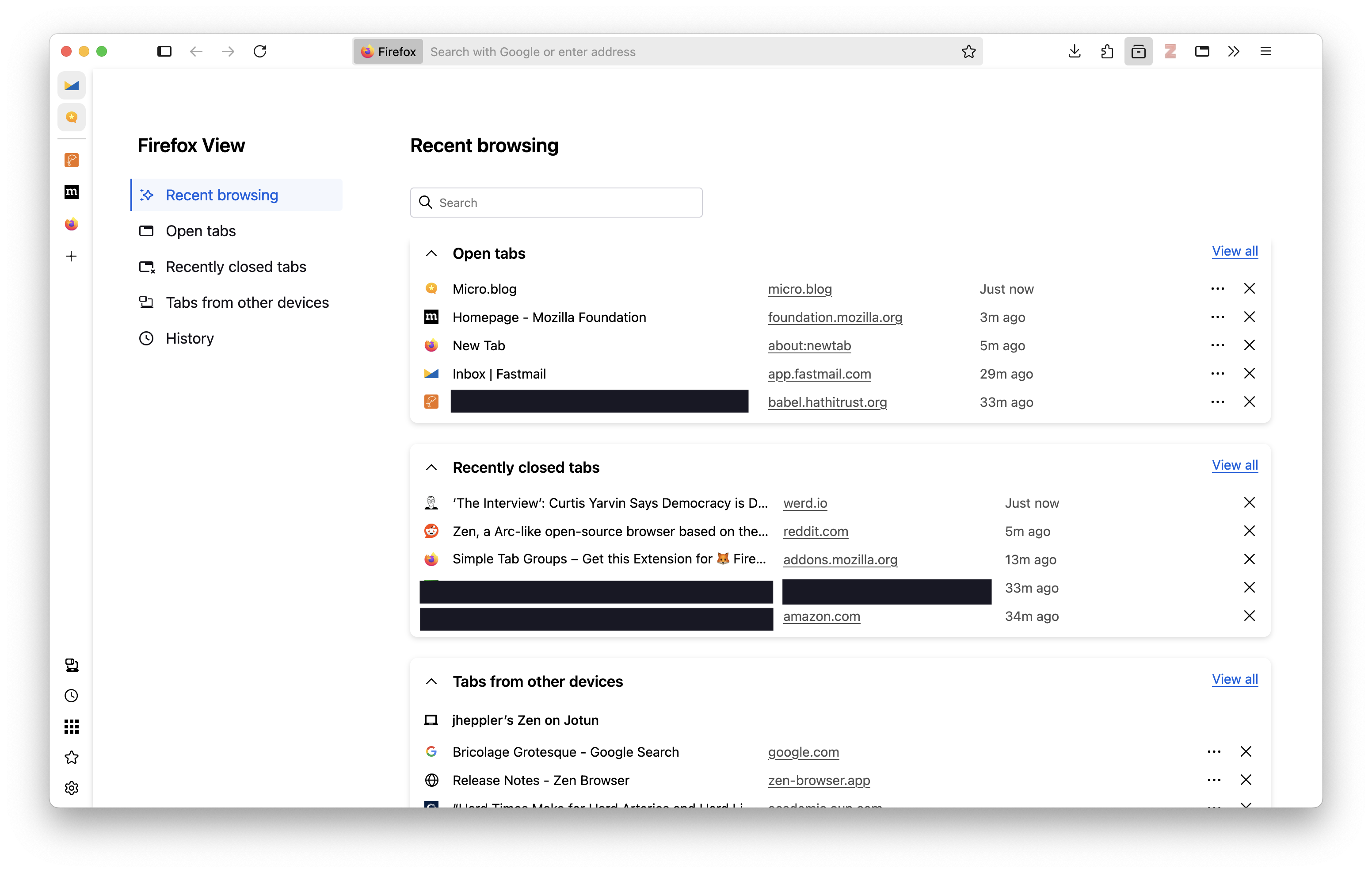
One feature I’ve not seen any other browser implement is what Mozilla calls Firefox View, and it’s really nice. View collects all of your tabs (currently open, recently closed, and tabs from other devices) all in one place in a simple interface. It’s a nice way to to fetch something from another device or find something in my browsing history.
iOS / iPadOS
The one misgiving I have about Firefox is not Mozilla’s fault: the iOS/iPadOS app.
Apple restricts how much third party browsers are able to do, meaning that they are really just wrappers around Safari/WebKit (that is, it’s Safari under the hood with different user chrome). This means my plugins are not usable since Apple’s WebKit plugin architecture is proprietary and only Safari can install plugins.1 A potential work-around especially for things like tracking blocking is Firefox Focus, but because it’s designed to be privacy centric it does not include your Mozilla profile.
For now that means I’m sticking with Safari on my phone and iPad because I still want access to the plugins I use. I might lose some potential helpful integrations this way (like tab syncing), but I’m perfectly happy with Safari.2
Zen features I’ve ignored
There are a few things Zen does that I would place into the realm of “window management”: things like web panels and split view, which are neat but not things I usually need so they’re not coming over to my Firefox. (There are ways to do this through add-ons, though, if you do like these features. Poke around the Firefox subreddit and you can find ways to do these things.)
I think what Zen is doing is actually very good: innovations in browsers, especially ones not built with Chromium, is a good thing for the web and a good thing for users. And, perhaps, Firefox will sherlock a few of these features into the core browser. But I want to support Firefox, and I appreciate Zen demonstrating another way to experience how we interact with the web.
Extensions
Here are the current add-ons I have for Firefox:
- Zotero: Bibliographic management, and probably the one digital tool I’ve been using the longest.
- Unpaywall: Another scholarly tool. An open database of 20+ million scholarly works. If I’m on a page for an article, it notifies me if there’s a legal open access version and provides a link to it.
- uBlock: The go-to for content blocking.
- uBlacklist: I primarily use this to block AI slop and content farms results in my Google search. Works great.
- Chrome Mask: Optionally make Firefox look like Chrome to websites.
- Bot Sentinel: Notify me if an online account is a bot, toxic account, content farm, or toll. Less useful now that I never go on Twitter but I keep it around.
- Firefox Multi-Account Containers: Keep cookies separated by containers.
- Privacy Badger: An extra layer of tracker blocking on the web.
- Simple Tab Groups: For workspace-like tab management.
- Web Archives: Come across a page that no longer exists? This extension looks it up in the Internet Archive and delivers an older version of it.
- &udm=14: I don’t Google’s AI-generated results helpful in my search results. This lets me avoid it by appending
&udm=14to Google search results. - Adaptive Tab Bar Color: Color the tab bar the same as a site’s theme.
- iCloud Passwords: I use Apple Passwords, and this Apple-created add-on integrates Passwords with Firefox. Not excellent yet, at least not as seamless as using in Safari. Occasionally causes some sites to become slow.
- Firefox Translations: Mozilla’s implementation of a site translation tool.
- Fakespot: An excellent tool for spotting bot-manipulated reviews in places like Amazon and other online stores.
-
The Orion browser by Kagi can install Chrome and Firefox extensions through what must’ve been a monumental amount of engineering work, but I’ve not given this a try yet. ↩︎
-
I’m of two minds about this restriction. I would love to see more creative approaches to mobile browsing by allowing third party browser engines on iOS devices. On the other hand, not even Android supports Chrome’s extensions all that well. So I’m also doubtful that extensions will work well on mobile devices with custom browsers, at least not on par with their implementation on desktops. ↩︎