Skip to content
Jason A. Heppler

Microblog

Microblog

Software I Use

I am picky about the software I use. But I think I’m justified to be so: these are things that I use every day, and should help me get the work done I’m trying to do. So, as things stand in 2018, here is what I install on any new machine I work with.

Gestimer

When things get especially busy, I need a way to carve my day into blocks of time. The other problem: if I get focused on something, I’ll lose track of time. Gestimer helps remind me to take a break. While Pomorodo has never seemed to click with me, Gestimer serves as a good stand-in for that approach. If I need to focus on a task, I’ll tell the timer to remind me in 45 minutes to take a walk. It’s a small thing, but it works well for my brain.

Fantastical

While Apple’s default calendar app is pretty good, the ease of adding events to Fantastical can’t be beat. The natural language processing is too good to pass up, so triggering the app with a global shortcut lets me easily type “Call Paul on Monday at 3pm to discuss the podcast” all without the jumble of mouseclicks it would take to do that on any other calendar.

Alfred 3

Spotlight is good, and getting better, but for speed it can’t hold a candle to Alfred.

1Password

You should be using a password manager, and you should be using this one. Their apps are fantastic and they have great customer support.

iTerm 2

A great replacement for the default Terminal app.

neovim

Vim, but just the good parts. The killer feature is a much stronger plugin architecture.

Homebrew

Homebrew is how I install almost any software on my Mac that isn’t available in the App Store or on npm.

Visual Code Studio

I’ve abandoned Sublime Text and Atom for Microsoft’s Visual Code Studio when I’m doing Javascript and web development. Although I do most of my development work in vim and a terminal, the environment of Visual Code is terrific.

RStudio

When I’m not doing Javascript and web development, I’m writing in R. And no R environment is complete without RStudio. Not only is it a must for development, but it makes for a great teaching environment as well.

Firefox

I was a Chrome user for years, and waffled between Chrome and Safari for a long time (especially as the iPad become a go-to computer for working and Safari became rock-solid – but more on that in a future post). But with the launch of the new Firefox Quantum at the end of 2017, I’m back. It’s fast, privacy-conscious, and well-designed. Plus, Google is doing things hostile to a free and open web – so, I feel good throwing my support behind Mozilla and their mission to protect Internet health.1

Bear

I have nearly ten years worth of markdown files sitting in a notes directory in Dropbox that I keep synced with nvALT. And while this setup has served me well all this time, I’ve recently begun migrating much of that to Bear. With its markdown support but also rich text abilities, lovely design, solid iCloud syncing — and, of course, a whimsical Bear — it quickly became my default app for taking notes, keeping references, storing links, or planning projects.

Things 3

I think I’ve tried every task manager. After a year-long stint with Todoist, I’ve settled on Things 3. The design is gorgeous, but more than that the GTD system is still as steady and trustworthy as it was when I first started following its tenants years ago. Todoist had too many blockers that made it ineffective for my tastes (the lack of start dates being a big deal-breaker). Things handles all of this beautifully, and handles tasks in a way that I find just so human.

Nord VPN

You shouldn’t trust your ISP, and you really shouldn’t trust wifi networks you join from an airport or favorite coffee shop. Virtual private networks help secure your connection to networks. (Pro-tip: use Little Snitch to automatically block all incoming and outgoing traffic to your computer when you join an unknown wifi connection, and only allow the VPN connection before you grant the new network any level of trust.)

Pair this with Cloudflare’s new 1.1.1.1 DNS service and force HTTPS, and you have yourself a good setup for privacy and protection.

Dropbox and Backblaze

I’m lumping my sync service of choice and my backup service of choice into a singular heading. They’re both great.


  1. This isn’t to suggest I never use Chrome or other Google services. I use plenty of them. But I’m wary about the influence that the company exerts on the web. ↩︎
Tech life

Teaching the tidyverse to R novices

This semester I am running my R workshops once again, and as always I start by teaching people the packagers of the tidyverse. As part of Endangered Data Week, I am teaching two workshops introducing beginner R programmers to data tidying/manipulation and data visualization.

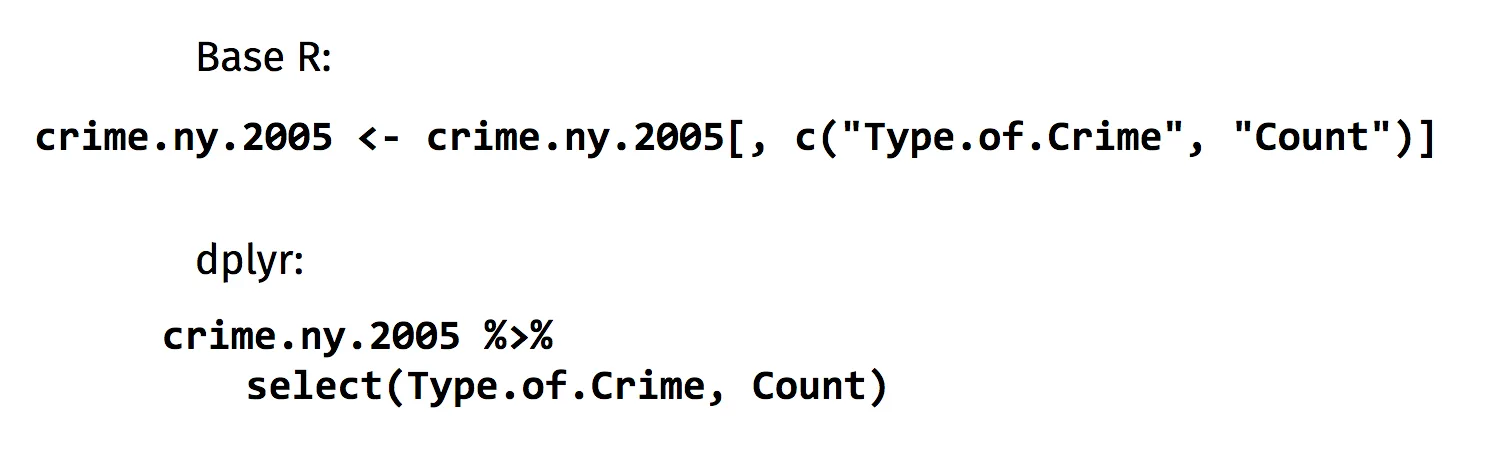
I’ve taken this approach to using the tidyverse instead of base R for two primary reasons. First, learning how to manipulate data with dplyr and tidyr is easy to understand conceptually and often easier than learning the idiosyncrasies of R. When I show students two lines of code that achieve the same thing in base R and dplyr, I’ve always gotten the same answer: the dplyr way is much easier to read and understand.

The ease of reading dplyr code vs. base R.

I’m not alone in my approach here — David Robinson has made the same case in regard to ggplot2. My rationale largely follows his: that teaching students the basics of the tidyverse means they can be up and running with a powerful set of tools quickly. In the case of Endangered Data Week, that means introducing students to messy government data, tidying that data, working with data to produce new data, and drawing conclusions. I’m able to teach these concepts relatively quickly thanks to the power behind dplyr and tidyr. I don’t need to worry about teaching the syntax around [[]] or $ or c(). If students need base R techniques or have questions, they can always get in touch with me for more pointers.

For our data manipulation exercises in our workshop, we work off an RMarkdown worksheet together during the session. I provide them with some population data I compiled for a project I worked on last year and we work through most of the functions available in dplyr and tidyr—and if we don’t get through it all, that’s fine; they have the worksheet to complete on their own time. (I make teaching these workshops a little easier for myself by also installing RStudio Server and the necessary packages on Digital Ocean so we can be up and running quickly.)

Second, students can be up and running with a good amount of knowledge about R, data manipulation, and visualization in a relatively short amount of time. After an hour-and-a-half together, even students who haven’t programmed previously are learning to work with the language. The grammar of data tidying allows these concepts to be grasped quickly since each step builds upon the previous one. Chaining together a series of tidyverse functions allows the students to see the steps necessary to reshape, clean, and explore a dataset. And those skills can be applied to any dataset, meaning students can take what they learn and use them towards other projects or classes. Likewise, I prize tidyverse methods for their consistency. I’ve seen some wild ways people have accessed or manipulated columns in a data frame (just spend some time on Stack Overflow), but anytime I read someone’s tidyverse example the process clicks faster. That consistency, again, makes using, finding answers, and learning the language that much easier.

This isn’t to say I don’t teach any base R — even in the above workshops, students still learn about sum(), slice(), logical operators, and other base methods. But pairing some of the base R methods with the tidyverse makes for a powerful set of tools that can have students manipulating and visualizing data quickly.

This approach of teaching tidyverse with an interactive worksheet has worked well — students are up and running with R and applying new skills quickly. My goal is to help people to work with data, and the tidyverse provides a powerful way to get started.

Programming

Endangered Data Week

In 2017, Brandon Locke voiced an idea on Twitter: we needed an event to raise awareness, like Banned Books Week, to threats to publicly available data. Those threats were widespread and various: from outright censorship to benign neglect. We were inspired by the work of others, namely DataRefuge, the Environmental Data and Governance Initiative, and the work they were doing to secure environmental and climate data from an incoming presidential administration that does not believe in climate change. Joining with the Digital Library Federation, volunteers from around the world helped make EDW more successful that I could have imagined. With the support of our other partners — the Mozilla Science Lab, CLIR, DataRefuge — we helped showcase events all around the world focused on threats to public data.

We’re at it again this year. Next week, February 26 to March 2, is Endangered Data Week. And the concerns of last year are no less present this time around.

This year’s events once again cover a range of approaches, themes, and skills training. We currently have forty-two events scheduled so far across the U.S. and Canada, where attendees are learning:

Adding to our excitement this year is an announcement: Sarah Melton, Rachel Mattson, Brandon, and I are part of Mozilla’s fifth round of Open Leaders. Endangered Data Week’s curriculum development will be part of the Global Sprint May 10–11, 2018, as well. With Mozilla, we’ll be building out more instruction resources under the aegis of Endangered Data Week to promote data literacy, civic engagement, and a culture of data consciousness.

Academia

Migrating to Hugo

In my last post I mentioned how I had no concrete plans to migrate my site to Hugo despite testing out the platform a bit.

Well, that was short lived. I blame Netlify.

Not Netlify per se, but my Jekyll setup on Netlify. The issue I ran into was the huge amount of time it would take Jekyll to regenerate my site on Netlfiy and redeploy it. It reached the point of unacceptable (including setting up a Slack hook to get notified when the deploy started and when the deploy ended – just so I knew everything had successfully run in the ten to fifteen minutes it was taking). This likely comes down to how I’m using gulp to help compress CSS and images. But Hugo, as many others have noted, is fast. And in this case, that speed is important to me.

So, here we are. I probably, again, broke a few things. And the site will continue to go through some changes over time, as usual.1 But so far, I’m liking the new setup.


  1. I’m using a design borrowed from Kieran Healy↩︎

Tech life

HTTPS

I haven’t changed much about this website since I migrated to Jekyll in 2011. I’ve flirted here and there with Hugo, but don’t really have solid plans to fully convert over to it just yet. But I do feel that the standard on the web should be HTTPS, so I’m stepping away from my self-hosted site on Reclaim Hosting and moving over to Netlify. Netlify supports the same commit-and-publish workflow that Github pages does, but, more importantly, comes with Let’s Encrypt to provide SSL on custom domains.

I’ve taken some steps to clean up a few links across the site:

sed -i 's|http://jasonheppler.org|https://jasonheppler.org|g' *.md

That said, there might be some broken links yet – if you discover any, it’d be swell if you’d let me know!

Tech life

Mapping Omaha Bikes

I’ve been getting a bit involved with bicycle advocacy in Omaha, especially now that I’m starting to commute to work by bike. As part of this, I wondered about the safey of bicyclists and pedestrians in the city. So, I threw together a small R Shiny application for exploring pedestrian and bicycling accidents in Omaha.

It’s a fairly simple application, using some data provided by the Nebraska Department of Roads. You can find all of the code and data on Github.

If you’re interested in getting involved, hook up with some local and national organizations:

Personal

Recent Updates on Data Visualization

Just a few updates on some data visualization work I’ve either been taking in or working on:

Projects

Reading

  • I really enjoyed this data analysis by Quartz based on Google’s Quick, Draw! dataset. The analysis identifies how people from around the world draw a circle, and infer what it says about the drawer.
  • As usual, the New York Times has a powerful scrollytelling piece about migrants feeling Libya.

Watching

  • I recently watched Mike Bostock’s Open Viz keynote about d3.express and can highly recommend it. It’s an interesting take on code editing and programming experiences. If you’re new to D3.js, it’s an exciting time to be getting involved. If you’re already experienced in D3.js, it’s exciting to see the changes that have come or are coming.

Digital history

mozsprint

Next week, June 1 and 2, I am a site host and project leader for Mozilla’s Global Sprint, a fast-paced, two-day event to hack and build projects for a healthy Internet. Our site will be at the Community Engagement Center on the campus of the University of Nebraska at Omaha, and focusing on two projects.

Omaha Parks: Piggy-backing a bit on some of the issues raised during Endangered Data Week, I’m interested in open data and civic engagement. One of the areas I believe Omaha needs help is with its parks and open spaces. There’s no useful portal to discover the city’s parks, something we discovered as we tried to find parks appropriate for our daughter. Even the most basic of information was difficult to discover: are there playgrounds? Are the appropriate for specific age ranges? Are there infant swings? Is it accessible? Are there restrooms? There are a range of amenities that might be of interest to people who want to enjoy the parks, but they have no way to search or filter those parks that meet their needs and wants. So, we’re coming together for two days to jump-start this project. We’re welcoming ideas, so feel free to add to the discussion on the Issues tab.

Data Carpetry for the Humanities: I was intrigued by Micah Vandegrift’s suggestion that we start developing data carpentry for humanities data, an idea that quickly gained support on Twitter. The project is in the early stages of planning yet, but our site in Omaha will be available for anyone who would like to contribute at a physical space.

In Omaha? Register for the Sprint and stop on by. Or participate remotely by sharing ideas, text, data, or code with either of these projects. They’re in the open, so get on Github and help out!

Tech life

Digital History at the AHA: Workshops, Roundtables, Sessions

Next Thursday I’ll be teaching a workshop on network analysis for historians. You can find the schedule and material for the workshop online. In addition to the workshop, I’ll be part of the Digital History Table Talks lunch plenary and the digital drop-in session that afternoon.

On Thursday afternoon, I’ll be chairing a panel with Brandon Locke, Kalani Craig, and Lauren Tilton on historical sources as data. Come check us out!

And for a complete roundup of digital history sessions at this year’s conference, Seth Denbo put together a useful post detailing everything.

Academia

Podcasts Redux

A couple of years ago I wrote about some of my favorite podcasts, and I thought it would be good to update the list. Some of those podcasts have ended, others still keep on, and I’ve added new ones to my podcatcher of choice.

I’m currently subscribed to thirty-two podcasts. I might have a problem.1

  • Back to Work, 5by5: Back to Work was on my last list, and it still remains. I love this podcast. Dan Benjamin and Merlin Mann have wonderful chemistry together, and I usually end up with a lot of things to think about after each show—not only about #productivity, #creativity, #barriers, but also enjoy their detours into parenting, comic books, and Dan’s phobias.
  • The Dan Benjamin Hour, 5by5: A newcomer to my list, DBH sometimes strikes me as part The Frequency, part Geek Friday. Dan and Haddie Cooke cover a range of topics regarding technology, gear, entertainment, and culture. Plus, the on-air chemisty between Dan and Haddie is great.
  • DLC, 5by5: Yes, another 5by5 show. No, this isn’t the last one. The DLC podcast hosted by Jeff Cannata and Christian Spicer is among my favorite gaming-focused podcasts, and every week they talk to somebody in or near the gaming industry. And lest you think it’s all about video games, it’s not! Although video games are often the focus, they also have a regular Tabletop Time where they share their favorite boardgames. I’ve picked up many suggestions from that segment of the show.
  • Additional 5by5 shows: Although they’re produced less often, both The Frequency and Grit are great shows—The Frequency for its news, and Grit for it’s discussions on work culture. I’m also an occassional listener of the Latest in Paleo show hosted by Angelo Coppola.
  • Roderick On the Line: What can one say about Roderick on the Line with John Roderick and Merlin Mann? Just keep a small bag packed, and keep moving or get out of the way. #supertrain.
  • Accidental Tech Podcast: I was sad when Hypercritical and Build and Analyze came to an end, but delighted when Marco Arment, Casey Liss (who?), and John Siracusa started a new tech podcast. These are, as you might expect, frequently long shows, but also good for keeping up on Apple news or playing in the background while I do some C-level writing.
  • Reconcilable Differences, RelayFM: Launched just this week, this is one of the shows I always dreamed about. Hosted by John Siracusa and Merlin Mann, the show pitches itself as “try[ing] to figure out exactly how they got this way.” The first episode is excellent, and I only expect that future episodes will remain that way.
  • Nerds on Draft: Technology and beer, in one podcast. Hosted by Gabe Weatherhead and Jeff Hunsberger, the show opens with a particular beer or style before doing a deep dive into a technology topic. I enjoy the perspectives Gabe and Jeff bring, and their beer recommendations are top notch. (They even built a great app.)
  • Talking Machines: Recommended to me by Lincoln Mullen, Talking Machines is an excellent podcast on machine learning. The shows are very well produced, and feature interviews with researchers in the field. For starters, check out their episode with David Blei.
  • This American Life, NPR: Probably among the most famous (or, at least, most subscribed to) podcasts. Ira Glass always produces great shows, and TAL is usually a weekly listen for me.
  • Radiolab, NPR: Radiolab is also probably a contender of most-famous-podcast, covering topics on science, philosophy, and human experience. Again, it likely needs no introduction.
  • Backstory: Backstory with Ed Ayers, Peter Onuf, and Brian Balogh is probably my favorite history-oriented podcast. The show interviews historians whose work often relates to some issue straight out of today’s headlines.
  • Who Makes Cents?: Hosted by historians Betsy Beasley and David Stein, Who Makes Cents is a monthly show focusing on the history of capitalism. They interview historians whose work explain how capitalism has changed over time. An excellent show that always seems to add another book to my ever-growing “To Read” list.
  • You Are Not So Smart: Hosted by David McRaney, You Are Not So Smart is a show about self delusion, cognitive biases, heuristics, and logical fallacies. A well-produced and entertaining show that mixes stories, monologues, and interviews with experts.
  • The JuntoCast: Although I’m not an early Americanist by training, the JuntoCast is excellent listening for anyone interested in the history of the early American republic. Their roundtables on historiographical discussions have to be the best out there right now (their episode on Edmund Morgan’s American Slavery, American Freedom is wonderful. It was like being back in a graduate seminar.)
  • The Incomparable: The Incomparable is a weekly show on geeky topics regarding movies, books, television, comics, and other topics. Usually a rotating panel of guests anchored by Jason Snell, I don’t catch every episode but I often enjoy their discussions on popular culture. Their Star Wars series include my favorite episodes. And how many pdocasts out there can record for an hour and a half about a two-minute long teaser trailer?
  • The First Draft Podcast: An odd show. But worth listening to from time to time.

There are many more shows I didn’t cover in detail here, but if you’re interested: Still Untitled: The Adam Savage Project, Buddhist Geeks, 5by5 at the Movies, 5by5 Specials, 5by5 After Dark, The Talk Show, You Look Nice Today (which might be coming back?), TeeVee, usually for the Game of Thrones discussion, Serial, Mac Power Users, The Dalrymple Report, Cortex, Digital Campus.


  1. In my defense, I don’t listen to every episode. ↩︎

Tech life

Newsletter

Occasional writing on the American West, agricultural history, and political culture.