Essay
How I Use Obsidian
Creating my research and note-taking environment
I mentioned on my recent appearance on Drafting the Past that I have migrated all of my historical research work into Obsidian, which prompted a few folks on Bluesky to ask about some details on how I use it. Here’s a run-down of what that’s like from the perspective of writing and historical research.
Over the past ten years, my process for organizing research notes has evolved a lot, but one key thing remains consistent: the notes are written in plain text. Much of this started in a Haskell-based wiki system called Gitit, introduced to me by my friend Caleb McDaniel (who is still using it!). But I had some frustrations with Gitit and ended up moving to DEVONthink for a long time. The ability to throw just about anything into the software and organize it with tagging and folders was incredibly helpful for me when it came to tracking themes, topics, ideas, people, and events. But, as I started doing more on mobile devices (both iPhone and iPad) I found DEVONthink’s mobile apps, at least in its early days, difficult to use.
Then along came Obsidian, which I probably first heard about from Cortex a couple years ago. I won’t hesitate to say that Obsidian, along with a few plugins, is the research and note-taking software I always wanted.
Before Obsidian
My other plain text note-taking systems came with frustrations. I found Gitit’s technical overhead to just be something I didn’t want to deal with Gitit’s technical overhead, and DEVONthink never handled plain text well to my liking. Obsidian has an enthusiastic community of users and a great team behind it, which makes me very optimistic about its future. And, since everything is plain text anyway, moving to some other system should the need arise becomes more trivial vs. a proprietary file format or database. There were other note-taking systems I used, such as Notational Velocity, that I used for things like meeting or reference notes (I never kept research notes there) which I eventually moved to Apple Notes. I even toyed with some vim- and emacs-based note taking systems (I’m not an emacs person but org-mode / org-agenda / org-roam has always seemed very appealing). But Obsidian became the key way for me to work with research notes that was easy and seamless to the work I’m doing.
Obsidian also has a rock-solid iPhone app and iPad app. Often if I’m on a flight the only device I like to have handy is my iPad, and having an Obsidian experience there that’s so similar to my experience on a desktop is fantastic. There are some limitations, certainly. Not every plugin I like on the desktop can work on the mobile app. But for the kinds of things I’m likely doing on an airplane (processing notes, reading and highlighting, adding metadata, etc.) it’s plenty good enough.
My Obsidian Setup
I use both folders and tags. My folders in Obsidian mimic my folder setup on my computers which follows the Johnny Decimal system for organizing information. The folders are designed as broad areas that can become more narrowly focused for the content that they hold. So, a folder called 40. Work contains a folder called 40.01 CHNM for all of my CHNM-related materials, which contains a folder 40.01.01 Meeting Notes or 40.01.02 Web Dev or 40.01.03 Projects for work-related meeting notes, reference files, and project references, respectively. Or, a folder called 60. Writing contains 60.01 Silicon Valley (my recent book), or 60.02 Sagebrush (my current book project) or 60.03 Blog or 60.04 Microblog and so forth.1
All of this keeps my content organized, and since I replicate the same structure on my desktop I know nearly instantly where I’ll find it. I also make extensive use of tags. Some are pretty self-explanatory (meeting notes get a tag meeting and are wiki-linked to an index note for a project or a person), others I use as part of my research process (more on that below). These become ways for me to easily search or find notes as I need them.
Writing in Obsidian
I mentioned on Drafting the Past that I still tend to use Scrivener for writing, but Obsidian plus a few plugins is making a very strong case for itself.
There’s a few things I’ve always liked to have in any of my writing environments for long-form writing:
- Typewriter mode: I’ve used this in vim, Scrivener, Ulysses, iA Writer, and Obsidian. The idea is that the current line I’m writing is always centered in the middle of my screen when typing or moving up and down in a document.
- Highlight mode: Similarly, I’ve always liked having the current sentence (or paragraph) I’m writing highlighted for me while the others are faded away.
- Quick insert footnotes: I tend to cite as I write, so having a way to quickly add a footnote is important; but, more essentially in plain text, I don’t want to have to think about the numbering of the footnotes.
- Zotero integration: This is where Scrivener falls down for me. The integration isn’t quite what I’d like. When I wrote my dissertation, I used BibTeX to handle citations. That remained the case for my book. I am still a heavy user of Better BibTeX for BibTeX support in Zotero, and still prefer compiling documents using BibTeX.
In Obsidian, several plugins have allowed me to create the writing environment I like:
- Stille: Inspired by vim-limelight, it highlights the section of text you’re working on.
- Typewriter Scroll: Keep the line of text centered on the screen. I’ll likely be replacing both Typewriter Scroll and Stille with Typewriter Mode which includes both typewriter mode and line highlighting, and is more actively updated. I don’t keep this on all the time, I only activate it when I’m writing, along with Focus Mode.
- Focus Mode: Hides the sidebars to focus on the active pane. I usually send Obsidian into full-screen mode and hit my hotkey for Focus Mode and I’m ready to go.
- Zotero Integration: Useful both for generating book notes with their appropriate metadata, and inserting BibTeX citations.
- Pandoc plugin: For compiling writing into
.docxor.pdffiles. - Longform: I like writing in chunks of text (a la Scrivener), and Longform helps replicate that in Obsidian.
- Obsidian Footnotes: Easily insert and manage footnotes.
- Tidy footnotes: If I move a paragraph or footnote around and the numbering sequence gets out of order in the document, this plugin sequentially re-numbers everything to keep things in order.
- Footnote and Citation Indicator: Just a simple indicator that displays a small icon on the lefthand drawer of a document indicating that there’s a footnote in a line of text. Although it seems this has been sherlocked by Better Word Count (which I also use).
My Zotero Integration book note template
I use the following template for my book notes.type: "{{itemType}}"{% for type, creators in creators | groupby("creatorType") -%}{% if loop.first %}
{% endif %}{{type | replace("interviewee", "author") | replace("director", "author") | replace("presenter", "author") | replace("podcaster", "author") | replace("programmer", "author") | replace("cartographer", "author") | replace("inventor", "author") | replace("sponsor", "author") | replace("performer", "author") | replace("artist", "author")}}: "{%- for creator in creators -%}{%- if creator.name %}{{creator.name}}{%- else %}{{creator.lastName}}, {{creator.firstName}}{%- endif %}{% if not loop.last %}; {% endif %}{% endfor %}"{% if not loop.last %}
{% endif %}{%- endfor %}{% if title %}
title: "{{title}}"{% endif %}{% if publicationTitle %}
publication: "{{publicationTitle}}"{% endif %}{% if date %}
date: {{date | format("YYYY-MM-DD")}}{% endif %}{% if archive %}
archive: "{{archive}}"{% endif %}{% if archiveLocation %}
archive-location: "{{archiveLocation}}"{% endif %}
citekey: {{citekey}}
tags: #zotero, #source/secondary, {% if tags.length > 0 -%}{% for t in tags -%}#{% if t.tag == "secondary" %}source/secondary{% if not loop.last %}{% endif %}{% elif t.tag == "primary" %}source/primary{% if not loop.last %}{% endif %}{% elif "-project" in t.tag %}project/{{t.tag | lower | replace(" ", "-") | replace("-project", "")}}{% else %}subject/{{t.tag | lower | replace(" ", "-")}}{% endif %}{% if not loop.last %}
{% endif %}{%- endfor %}{%- endif %}
---
{{bibliography}}
[online]({{uri}}) [local]({{desktopURI}}) {%- for attachment in attachments | filterby("path", "endswith", ".pdf") %} [pdf](file://{{attachment.path | replace(" ", "%20")}})
{%- endfor %}
### Index
start-date:: {% if date %}{{date | format("YYYY-MM-DD")}}{% endif %}
end-date::
page-no:: {% for annotation in annotations %}{% if loop.first %}{{annotation.pageLabel}}{% endif %}{% endfor %}
### Connections
### Thoughts
### Note
{% macro calloutHeader(color) -%}
{%- if color == "#ff6666" -%}
Important
{%- endif -%}
{%- if color == "#5fb236" -%}
Reference
{%- endif -%}
{%- if color == "#2ea8e5" -%}
Question
{%- endif -%}
{%- if color == "#a28ae5" -%}
Disagreement
{%- endif -%}
{%- endmacro -%}
{% persist "annotations" %}
{% set annotations = annotations | filterby("date", "dateafter", lastImportDate) -%}
{% if annotations.length > 0 %}
### Annotations
Imported on {{importDate | format("YYYY-MM-DD h:mm a")}}
{%- for annotation in annotations %}
{% if annotation.color !== "#ffd400" %}
> [!quote{% if annotation.color %}|{{annotation.color}}{% endif %}] {{calloutHeader(annotation.color)}} >{%- endif -%}{% if annotation.imageRelativePath %}
> ![[{{annotation.imageRelativePath}}]] {% endif %}{% if annotation.annotatedText %} > {{annotation.annotatedText}} [(p. {{annotation.pageLabel}})](zotero://open-pdf/library/items/{{annotation.attachment.itemKey}}?page={{annotation.pageLabel}}&annotation={{annotation.id}}){%- endif %}{%- if annotation.comment%}
> %%{{annotation.comment}}%%{%- endif %}{%- endfor %}{% endif %} {% endpersist %} >
type: "{{itemType}}"{% for type, creators in creators | groupby("creatorType") -%}{% if loop.first %}
{% endif %}{{type | replace("interviewee", "author") | replace("director", "author") | replace("presenter", "author") | replace("podcaster", "author") | replace("programmer", "author") | replace("cartographer", "author") | replace("inventor", "author") | replace("sponsor", "author")  | replace("performer", "author") | replace("artist", "author")}}: "{%- for creator in creators -%}{%- if creator.name %}{{creator.name}}{%- else %}{{creator.lastName}}, {{creator.firstName}}{%- endif %}{% if not loop.last %}; {% endif %}{% endfor %}"{% if not loop.last %}
{% endif %}{%- endfor %}{% if title %}
title: "{{title}}"{% endif %}{% if publicationTitle %}
publication: "{{publicationTitle}}"{% endif %}{% if date %}
date: {{date | format("YYYY-MM-DD")}}{% endif %}{% if archive %}
archive: "{{archive}}"{% endif %}{% if archiveLocation %}
archive-location: "{{archiveLocation}}"{% endif %}
citekey: {{citekey}}
tags: #zotero, #source/secondary, {% if tags.length > 0 -%}{% for t in tags -%}#{% if t.tag == "secondary" %}source/secondary{% if not loop.last %}{% endif %}{% elif t.tag == "primary" %}source/primary{% if not loop.last %}{% endif %}{% elif "-project" in t.tag %}project/{{t.tag | lower | replace(" ", "-") | replace("-project", "")}}{% else %}subject/{{t.tag | lower | replace(" ", "-")}}{% endif %}{% if not loop.last %}
{% endif %}{%- endfor %}{%- endif %}

---

{{bibliography}}
[online]({{uri}}) [local]({{desktopURI}}) {%- for attachment in attachments | filterby("path", "endswith", ".pdf") %} [pdf](file://{{attachment.path | replace(" ", "%20")}})
{%- endfor %}

### Index

start-date:: {% if date %}{{date | format("YYYY-MM-DD")}}{% endif %}
end-date::
page-no:: {% for annotation in annotations %}{% if loop.first %}{{annotation.pageLabel}}{% endif %}{% endfor %}

### Connections

### Thoughts

### Note

{% macro calloutHeader(color) -%}
{%- if color == "#ff6666" -%}
Important
{%- endif -%}
{%- if color == "#5fb236" -%}
Reference
{%- endif -%}
{%- if color == "#2ea8e5" -%}
Question
{%- endif -%}
{%- if color == "#a28ae5" -%}
Disagreement
{%- endif -%}
{%- endmacro -%}

{% persist "annotations" %}
{% set annotations = annotations | filterby("date", "dateafter", lastImportDate) -%}
{% if annotations.length > 0 %}

### Annotations

Imported on {{importDate | format("YYYY-MM-DD h:mm a")}}

{%- for annotation in annotations %}
{% if annotation.color !== "#ffd400" %}

> [!quote{% if annotation.color %}|{{annotation.color}}{% endif %}] {{calloutHeader(annotation.color)}} >{%- endif -%}{% if annotation.imageRelativePath %}
> ![[{{annotation.imageRelativePath}}]] {% endif %}{% if annotation.annotatedText %} > {{annotation.annotatedText}} [(p. {{annotation.pageLabel}})](zotero://open-pdf/library/items/{{annotation.attachment.itemKey}}?page={{annotation.pageLabel}}&annotation={{annotation.id}}){%- endif %}{%- if annotation.comment%}
> %%{{annotation.comment}}%%{%- endif %}{%- endfor %}{% endif %} {% endpersist %} >
Theme and Design
I have an Obsidian theme I’m working on based off an emacs theme I really like, but honestly I spend most of my time using the Minimal theme. The default Obsidian theme is fine, but Minimal offers some nice adjustments as well as its own plugin for modifying or adjusting styles.
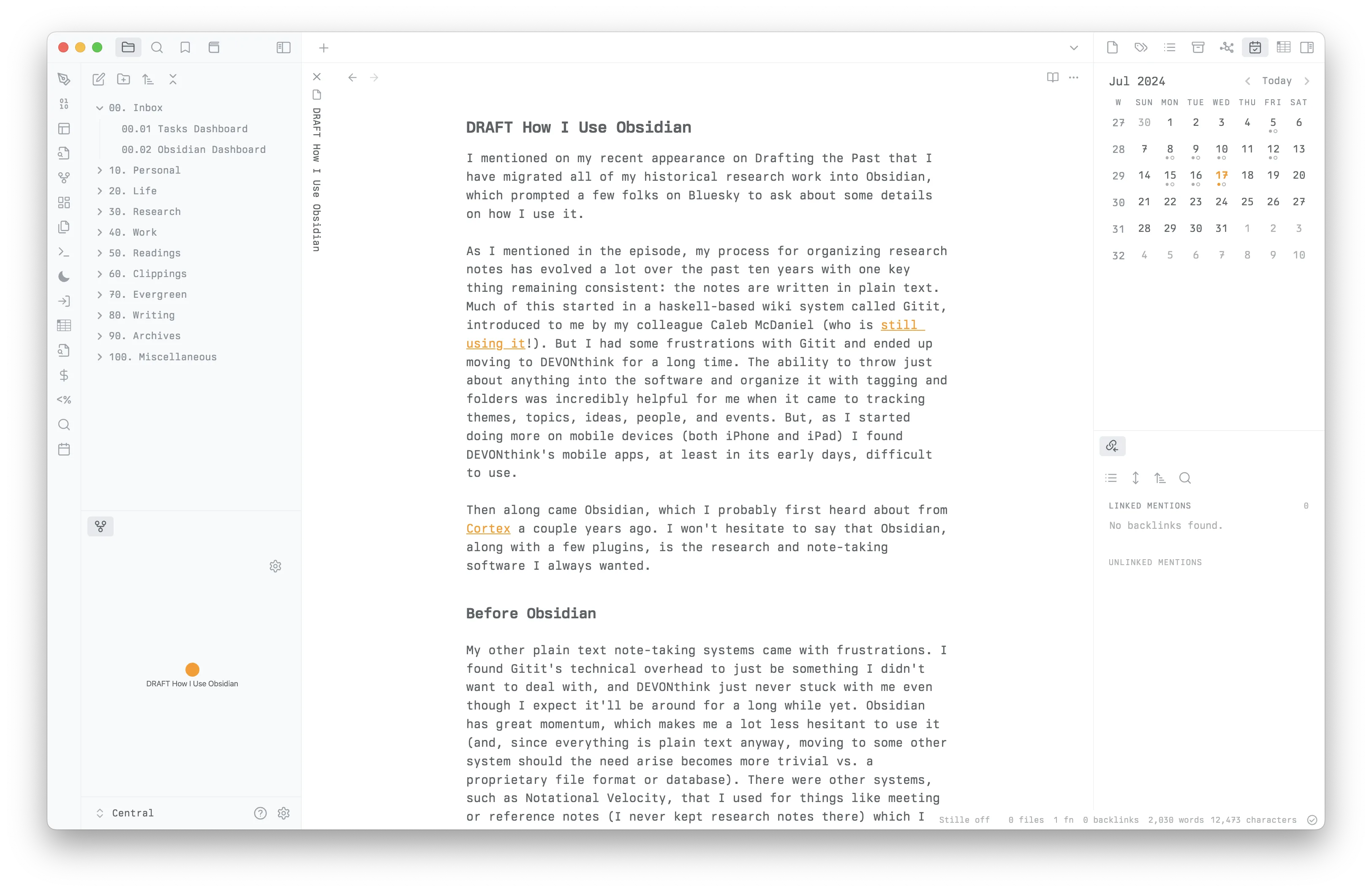
My Obsidian setup.
I’ve been jumping between iA Writer’s Quattro, Berkeley Mono, and default system fonts. I really love iA’s fonts (and the IBM Plex family, of which their fonts are derived from) but have settled on Berkeley Mono at the moment (the same font I use in my development environments).
Organizing Research
Now here is where things get interesting. I’ve been alluding to how I use Obsidian for organizing my research, and here is where Obsidian has become a very powerful tool for me.
The lynchpin to this is the plugin DataView. DataView lets you write custom queries that can search across your notes, taking advantage of either the plugin’s own markup for assigning inline fields or by reading Obsidian properties. (I started out using DataView’s inline fields but have since moved most everything into properties).
But I can also use DataView to drive complex queries across my notes. I’ve taken my cue here from Elena Razlogova, who wrote this great primer on using Obsidian for historians. I pair up some JavaScript with DataView to run keyword queries or queries across any of my properties that allows me to pull together collections of notes, sources, transcriptions, and analysis that I’ve written.
For my research notes, I have an overall folder of 30. Research that contains subfolders on my various research or book projects. Each of those have a Meta folder that contain a set of documents designed to search only within those specific research folders.
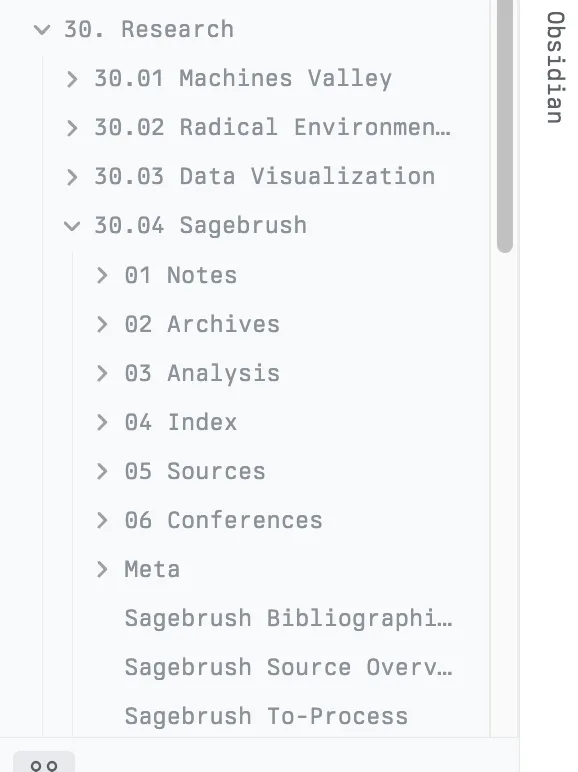
My Obsidian research folder structure.
Key to this is a note called Search Research Notes that looks like the following:
keyword::

author::
recipient::
title::
publication::
date::
archive::
archive-location::
organization::

note-title::
start-date::
end-date::
comment::
tags::

sortby:: date
sortorder:: asc

---

```dataviewjs
await dv.view("30. Research/30.04 Sagebrush/Meta/Dataview", { keyword: dv.current().keyword, author: dv.current().author, recipient: dv.current().recipient, title: dv.current().title, publication: dv.current().publication, date: dv.current().date, archive: dv.current().archive, archivelocation: dv.current()["archive-location"], notetitle: dv.current()["note-title"], startdate: dv.current["start-date"], enddate: dv.current()["end-date"], comment: dv.current().comment, tag: dv.current().tag, sortby: dv.current().sortby, sortorder: dv.current().sortorder });
```
This allows me to do some fairly complex searches by keyword (which looks through the entire note text and note title), filter by dates, filter by tags, gather all notes from a specific archive, or assign sorting by note title or descending/ascending order. As I search, the results of the search are displayed as a table below these fields right from within my Search Research Notes document (you can see it in action in Elena’s guide). I also have two additional “helper” documents, one that displays my last twenty research notes and another that shows all of my notes as a timeline (i.e., all sorted by date). These, again, come from Elena—I highly recommend checking it out, where you can find these templates and the JavaScript needed to power them.
I transcribe my sources in a Sources folder, all of which contain the same set of Obsidian properties that allow me to add metadata to the document. Those properties look something like this:
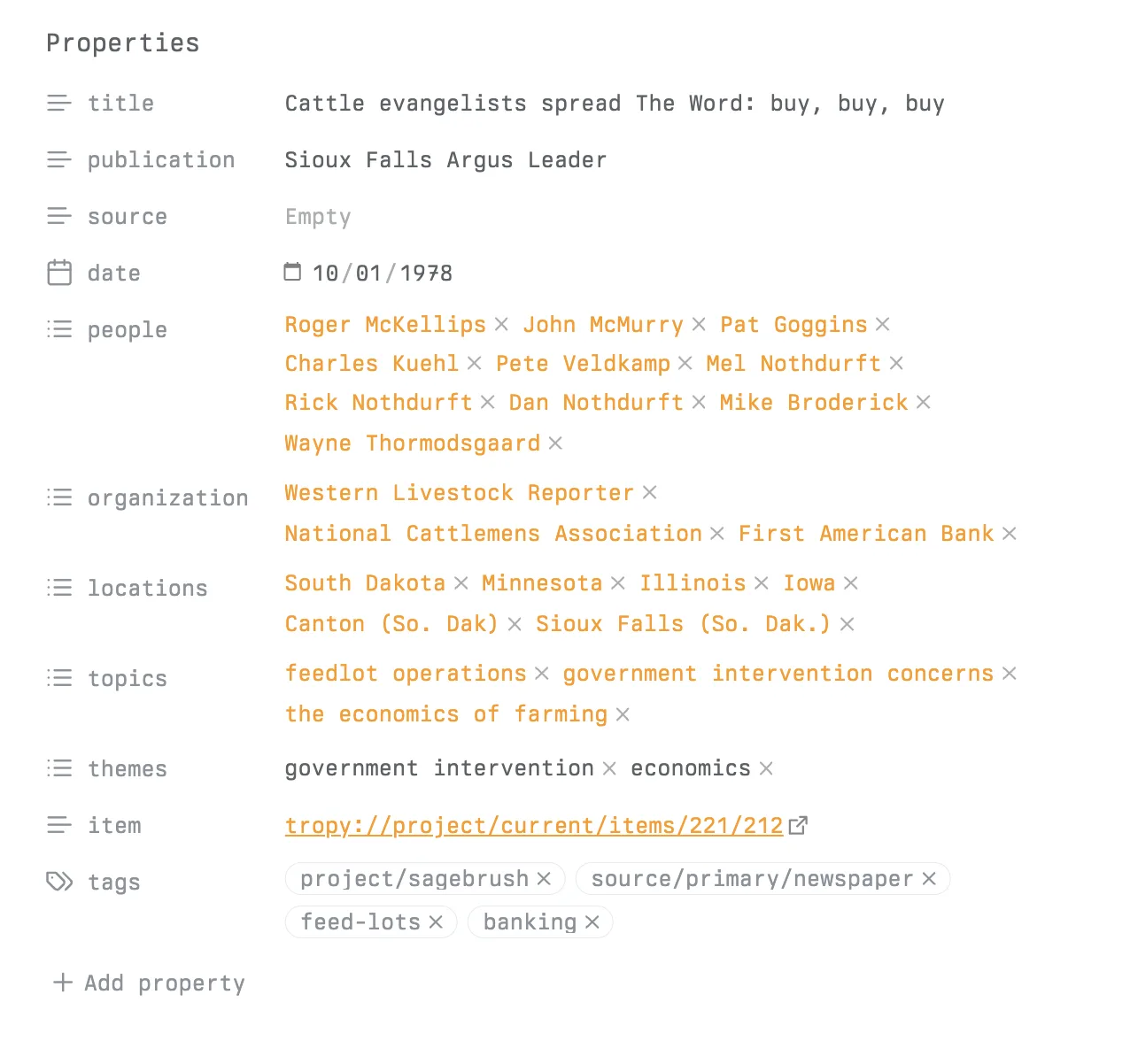
My Obsidian properties.
The properties do a few things for me. First, they serve as metadata about the document: basic things like where in the archives I found it, the date, the title. But I also note lots of details that link to index notes, which allows me to find all related notes with that share that document (so, indexes like individual people, organizations, locations, or topics for analysis) tags, and links which link over to my Tropy record of an item (which is where I keep photographs and PDFs, but I also replicate the archive structure of Collection > Box > Folder in my file system). I also have a holdover from my DEVONthink days where I use the tag bridge to indicate a note whose primary intent is a synthesis and analysis of other notes, and most of these notes reside in a subfolder of my research project folder called Analysis. These notes, documents, and indexes become the basis of actually drafting text.2
I’ve come to prefer the index notes instead of tags for things like people, places, organizations, and themes. The reason is I cannot take notes on a tag, but I can on an index note. I can also still see any note that references that index, including notes that may not have a direct wiki link. For people this is very useful: in the “Linked Mentions” and “Unlinked Mentions” pane in Obsidian, I can see any of the notes that belong to or reference the note; I can make this even more useful by using the Obsidian alias property to capture things like alternate spellings of names or alternate organization names and abbreviations. This helps me keep track of all sorts of notes that I can bring together and synthesize.
I can also make an index of the indexes; I find this particularly useful for people and organizations. Using the DataView plugin, I can create something like this:
```dataview
TABLE without ID
	file.link AS "name",
	occupation AS "occupation",
	end-date AS "dod",
	length(file.inlinks) AS "mentions"
FROM ("30. Research/30.04 Sagebrush" AND #biography)
SORT file.name asc
```
This view finds anyone with the tag #biography in my research project’s folder and generates a table of people, their occupation, their date of death, and how many times a file is linked to a person (hence the field “mentions”). A note page for an individual tends to look like this:
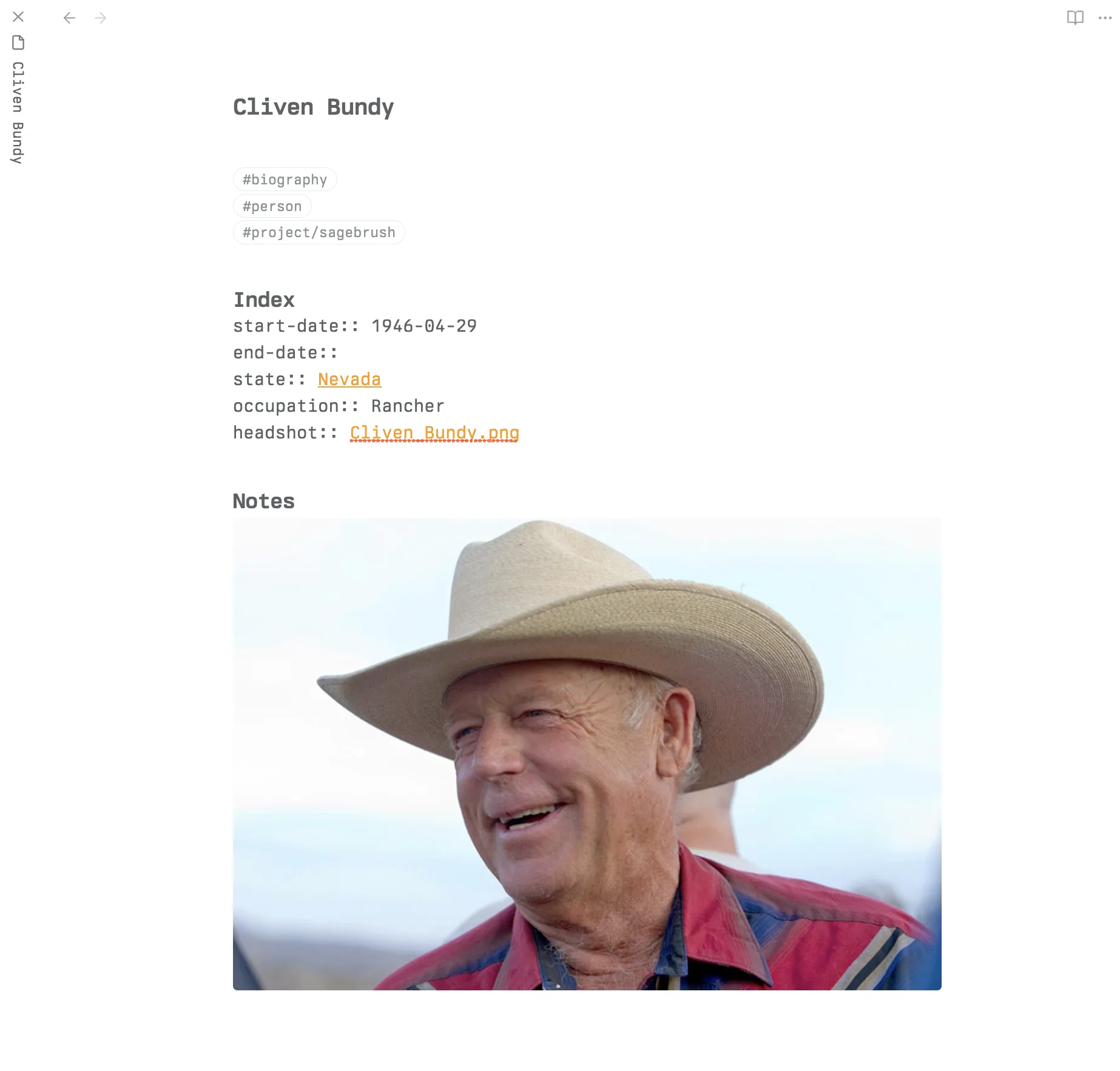
My Obsidian person notes.
As you saw above in my screenshot setup, I do keep a local graph of my current note visible at all times; I haven’t yet found this particularly useful but I’m keeping it there as a bit of an experiment. As I continue to add notes and sources for my current book project, I’ll be curious to see if visualizing those connections lead to any new ideas or threads to follow. I don’t otherwise find the graph view to be that useful for navigating notes, especially the full graph view. Some people like to see it, though, so here’s the full network.
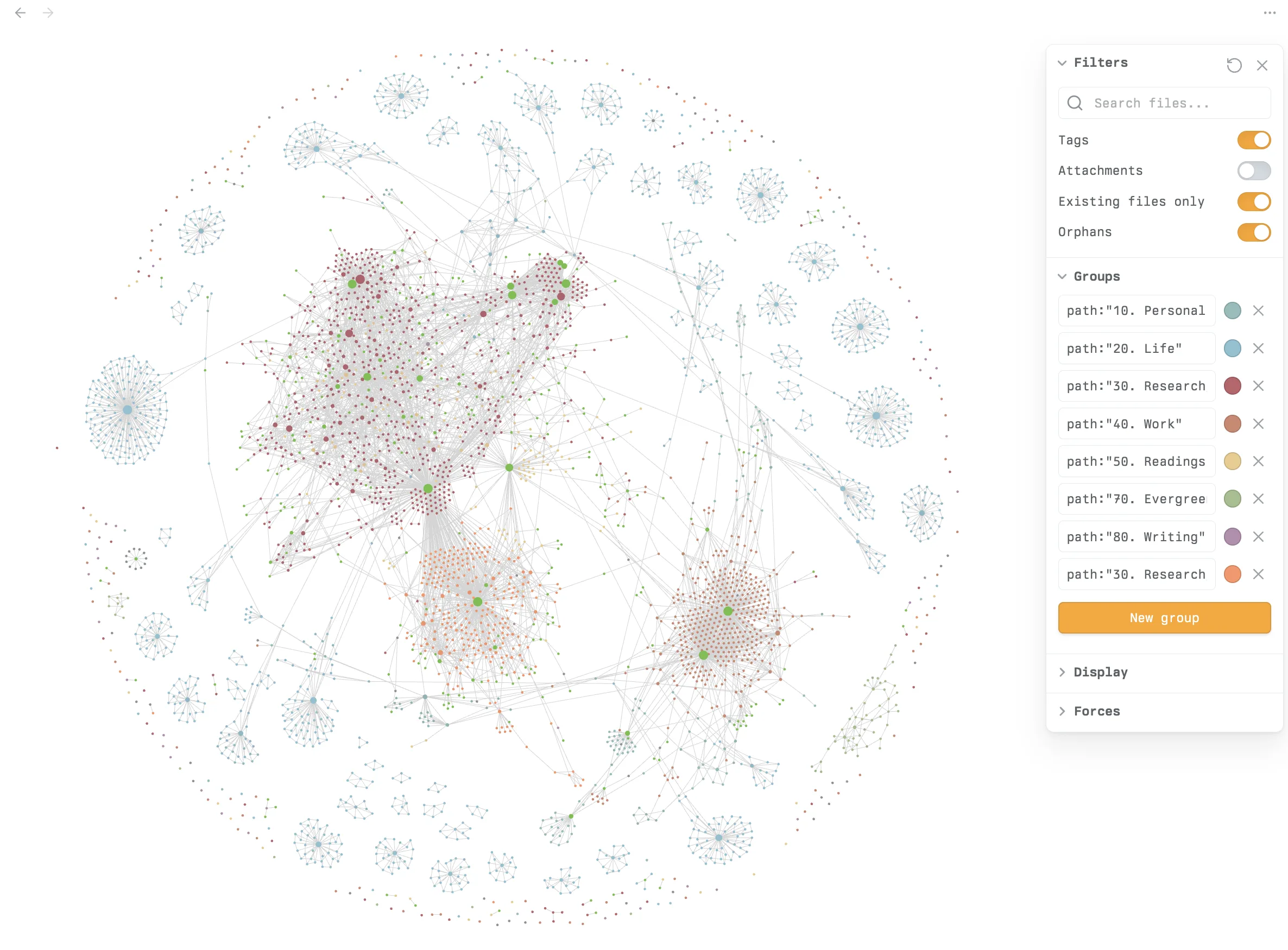
My Obsidian network graph.
Some additional plugins
I have a few other plugins that help make Obsidian an even more powerful tool.
- Graph Analysis: This attempts to find notes that are related to one another algorithmically.
- Daily Notes: I create a daily note everyday to track a few tasks and log things throughout the day. I have “Open daily note on startup” turned on.
- Note Refactor: This allows me to take a selected portion of a note and create a new note from it. This is useful for making atomic notes.
- Omnisearch: A better search for Obsidian. I find the default vault search pretty abysmal.
- Tasks: I tend to keep my tasks in Things, but occasionally I will throw tasks into a meeting note. I have a file called
Tasks Dashboardthat collects together any task across the entire vault so I can keep tabs on tasks and ensure they’re either completed or moved over to Things. - Templater: A really useful plugin for creating templates that can insert data and information automatically. I use this primarily for creating new archival notes templates, new book notes templates, and daily note templates.
- Outliner: I make outlines a lot, and this is useful for easily folding, indenting, and moving list items.